How to keep homeowners updated so the phone stops ringing
A short update on the same day every week, so the homeowner knows what’s happening before they think to call.
Most calls from a homeowner ask one of three things: what’s happening, when it will be done and what it will cost. By the time they call, they’ve been wondering for a while.
A short update on a set day answers all three before anyone asks. The calls drop, and when something does go wrong, the homeowner already trusts what you tell them.
Pick a day and keep to it
Choose one day and send the update every week on that day. Friday afternoon suits most jobs: the week’s work is done, and the homeowner has the weekend to read it.
Send one in a quiet week too. A line saying nothing moved because you were waiting on the inspector is news to the person paying for the job.
Agree at the start how they’ll hear from you: the update in writing, a call for anything urgent, and one person on your side to ask. Two people answering means two answers.
Some jobs need more. If the family is living in the house, or the owner is away, send two a week. Less than once a week leaves room for worry.
What to put in every update
Keep it short enough to read on a phone. Five parts cover almost every week:
- What got done. The progress they can see, in their words. Say the cabinets are in, not that the uppers are set and shimmed.
- What’s next. Next week’s work, who’ll be in the house, and anything that affects them: noise, dust, the water off for a morning.
- What’s waiting on them. Every decision you need, with the date you need it by. A tile nobody has picked holds up the tiler.
- Any change, and its price. Each change, signed or still waiting, and where the total stands.
- The finish date. Whether it still holds. If it has moved, say why and give the new date.
Leave out the trade talk, your own problems and anything that sounds like blame. The update is about their home, not your week.
Keep the money in plain view
Homeowners rarely fall out with a contractor over one change. They fall out over five changes they never saw adding up.
Put the running total in every update: the contract, each change signed since, and what the contract is now. Show changes still waiting apart, so they can see what signing would add.
| Contract, as signed | $248,500.00 |
|---|---|
| Change 1, moving a door, signed | $1,897.50 |
| Change 2, extra pot lights, signed | $3,240.00 |
| Contract today | $253,637.50 |
| Change 3, heated bathroom floor, waiting | $2,150.00 |
| Contract if change 3 is signed | $255,787.50 |
With this in every update, the final invoice holds no surprises.
And price every change before the work starts. The guide to pricing an extra shows how to cost one and get it signed.
Show the work with photos
A homeowner who can’t visit often reads the photos more closely than the words. Three to five good ones a week is plenty.
- The same spot, week by week: the empty room, the framing, the drywall. Progress is easier to see than to describe.
- What the walls will hide: wiring, plumbing and insulation before they’re closed in. It shows work they’ll never see again, and it’s a record for their next renovation.
- Anything you’re asking about: the rot behind the tile, or the beam that’s in the way of the new window.
Take them from where the homeowner would stand, in good light, with the tools and the mess out of the shot.
Give bad news early
A delay or a problem never gets easier to tell. Tell the homeowner the day you know, while there’s still time to choose what to do about it.
Call first if it’s big. Reading about a two-week delay in an email feels like an ambush. Then put it in writing the same day, so it’s on record.
Either way, say three things:
- What happened, plainly, without blaming anyone.
- What it means for them: the date, the cost, the noise.
- What you’re doing about it, and when they’ll hear from you next.
A homeowner who hears it from you early will usually work with you. One who finds out on their own starts checking everything else you say.
Put every decision in writing
Decisions made in the kitchen are where arguments start. The homeowner asks for an outlet to move over a bit, and three weeks later nobody agrees on how far.
After any decision made on site or on the phone, send a short note the same day: what was decided, who decided it, and any cost or time it adds.
A change to the price or the scope is a change order, signed before the work. A choice inside the scope, like a paint colour, needs only the note and a line in the next update.
Check your contract
Your contract may say how changes are approved and by whom. Some provinces and states also have consumer protection rules for home renovation contracts. Check what applies to you.
Finish with a proper hand-off
The last update is the one they’ll keep. When the job is done, send one with everything they’ll need later:
- The final walk-through list, with a date for each item.
- Warranties and manuals for everything you installed.
- Paint colours and the tile and fixture models, so they can match them later.
- Photos of what’s inside the walls.
- Who to call if something goes wrong, and how your warranty works.
Send the final invoice with it. If every update carried the running total, the last number is one they’ve already seen.
How CrewLog does it
CrewLog drafts the AI owner update from the job’s latest daily reports: how it’s going, what got done, what’s next, and anything waiting on the client.
Change orders still waiting for a signature go in with what they add up to. You edit the draft like any email, then send it from the job.
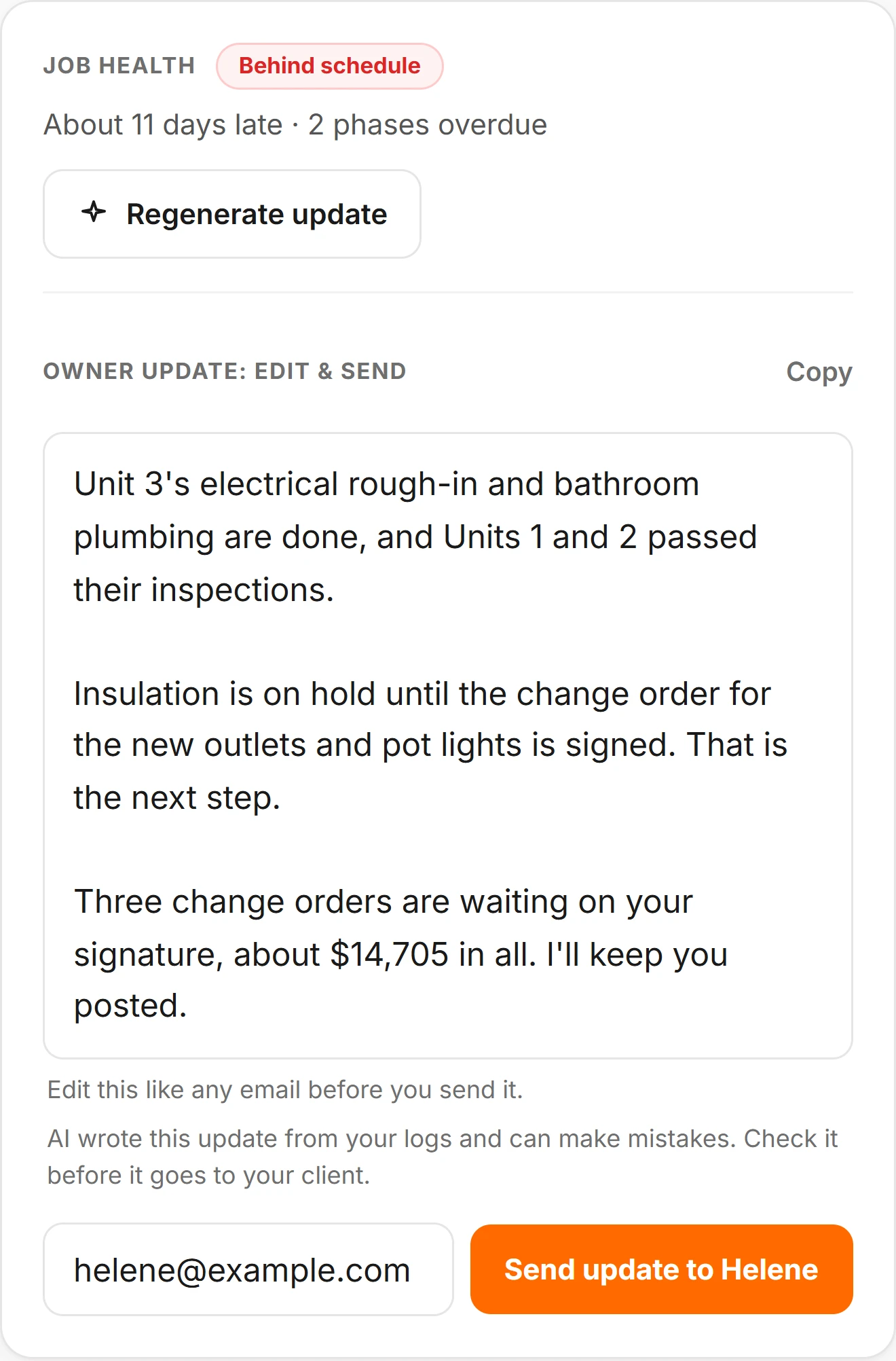

The update goes from your own email address if you’ve linked one, greets the client by name, and their reply comes back to you.
Daily reports can go to the client too, by email or as a link that opens with no login, photos included.
Change orders go out as a link the client signs on their phone. Quotes and invoices open from a link too, with no login, and a quote can be accepted right there.
The AI owner update is on Pro at $179 a month. Change orders are on Crew at $89 a month and Pro at $179; daily reports, quotes and invoices are on every plan, from $39 a month. Compare the plans.
More on the AI owner update, daily reports and change orders.