How to write an RFI that gets answered on time
When a question needs an RFI, what to put in it to get a straight answer, and what to do when the answer changes the price.
An RFI, a request for information, is a written question to the people who decide what gets built: the architect, the engineer or the owner’s representative.
You send one when the drawings and specs don’t tell you how to build something, or tell you two different things.
A good RFI gets a clear answer before the crew is held up. A vague one sits in someone’s inbox, then comes back with a question of its own.
Know when it needs an RFI
RFIs usually start in one of four places:
- The drawings disagree: the architectural sheet shows one thing, the structural or mechanical sheet another.
- Something is missing: a dimension, a detail or a finish nobody picked.
- The site doesn’t match: an existing pipe, beam or footing isn’t where the drawings show it.
- It can’t be built as drawn: a detail that won’t fit, or a product that’s no longer made.
Not every question needs one. If the answer is small and changes nothing, pick up the phone.
Write an RFI when the answer could change what gets built, the price, the schedule or another trade’s work, or when you’d want proof of it later.
If a call settles something that matters, confirm it by email the same day. A short note of what was agreed is a record. Your memory of a call isn’t.
Ask early. Read each stage’s drawings a few weeks before the work starts, and send your questions then, while there’s still time to answer them.
Put everything the answer needs in it
The design team answers fastest when they don’t have to write back and ask what you meant. Every RFI needs:
- One question. Two questions in one RFI often get one answer, and the second gets lost. Send two RFIs.
- Where it is. The drawing sheet and detail, the spec section, the grid line or the room. Add a photo or a marked-up sketch.
- What you found. What the drawings show, what’s there on site, and why the two don’t work together.
- Your proposed answer. Say how you’d solve it, and leave the engineering to the engineer. A yes or no is quicker to give than an answer from scratch.
- The date you need it by. Name the work that waits on the answer. A date tied to real work is harder to put off.
- Whether it could change the price or the schedule. Saying so up front means nobody is surprised when a change order follows.
Send it to whoever your contract names, often the architect or the owner’s representative. A subcontractor’s RFI usually goes through the general contractor.
Write it for someone who has never been on your site: short sentences, the names the drawings use, and none of your crew’s shorthand. Here’s one with every part in it:
- RFI‑014, Harbourview: the supply duct at the level 2 corridor bulkhead.
- Where: grid C/4, drawings A‑301 and M‑201, photo attached.
- Found: M‑201 shows a 400 mm duct, and the A‑301 bulkhead has room for 300 mm.
- Question: how should the duct get past the bulkhead?
- Proposed: run it 600 mm east, above the ceiling of room 214.
- Needed by: Thursday, November 19. The ceiling framing starts the Monday after.
- Price or schedule: no change, if the proposal is accepted.
Number every RFI and keep a log
Give every RFI its own number, in order, and never reuse one. Years later, RFI‑014 still means the same question to you, the architect and the owner.
Then keep a log with one line for each RFI:
- The number, the subject and the job.
- Who it went to, and the day it went.
- The date it’s needed by.
- Its status: open, answered or closed.
- The day the answer came back, and who gave it.
- Whether it changed the price or the schedule.
The log shows at a glance what’s late and what’s holding up work. Go through it every week, oldest first.
Chase it before it’s late
A due date doesn’t answer an RFI. The people answering it are working on other jobs too, and yours is one email of many.
- A few days before it’s due, send a short reminder with the RFI attached.
- On the day it’s due, call the person it went to and ask when you’ll have it.
- At every site meeting, go through the open RFIs and write each promised date in the minutes.
- When work is held up, say so in writing to whoever holds your contract: which RFI, since when, and what’s waiting.
Keep every reminder on the record, with its date. If a late answer costs you, those dates show it wasn’t for lack of asking.
Check what the answer changes
Read every answer for what it changes. Many confirm what you thought, and you build. Some change the work, and a change in the work can mean a change in the price or the time.
If the answer adds work, material or time, say so before you build it: price it and send a change order. The extras guide shows how.
If you’re told to go ahead before the price is agreed, get that direction in writing first.
An answer isn’t a change order. A reply that calls new work a clarification doesn’t settle who pays for it, so raise the cost in writing, inside the time your contract allows.
A late answer can cost you too, even when it changes nothing. Count the hours at what an hour costs you, the wage plus its burden:
| Crew waiting on the answer | 2 people |
|---|---|
| Days they waited | 2 days |
| Hours lost, at 8 a day each | 32 hours |
| Cost at $60 an hour | $1,920.00 |
If there’s other work to move the crew to, move them. When there’s none, the RFI’s dates and your daily reports are the record of what the wait cost.
Check your contract
Your contract may say how fast the design team must answer, and how soon and in what form you must give notice of a change or a delay. Read those clauses before the first RFI goes out.
Keep the record
When the answer comes, close the loop on site. Write the RFI number on the drawings at the detail it changed, so nobody builds from the old version.
File the RFI with the job: the question, the answer, who gave it and when, and every sketch and photo. When someone asks why it was built that way, that’s your answer.
When the job is done, keep the log with its records, for as long as your contract, your insurer or your lawyer says.
How CrewLog does it
In CrewLog, each RFI takes the next number in your company’s sequence, RFI‑001 and on, with its job, the discipline, who answers it, the due date and a teammate to chase it.
Write one yourself, or ask the Assistant to draft it from a daily report. It comes back as a card for you to check, and nothing is saved until you tap Confirm.
Birchwood · , Due Fri Sep 18
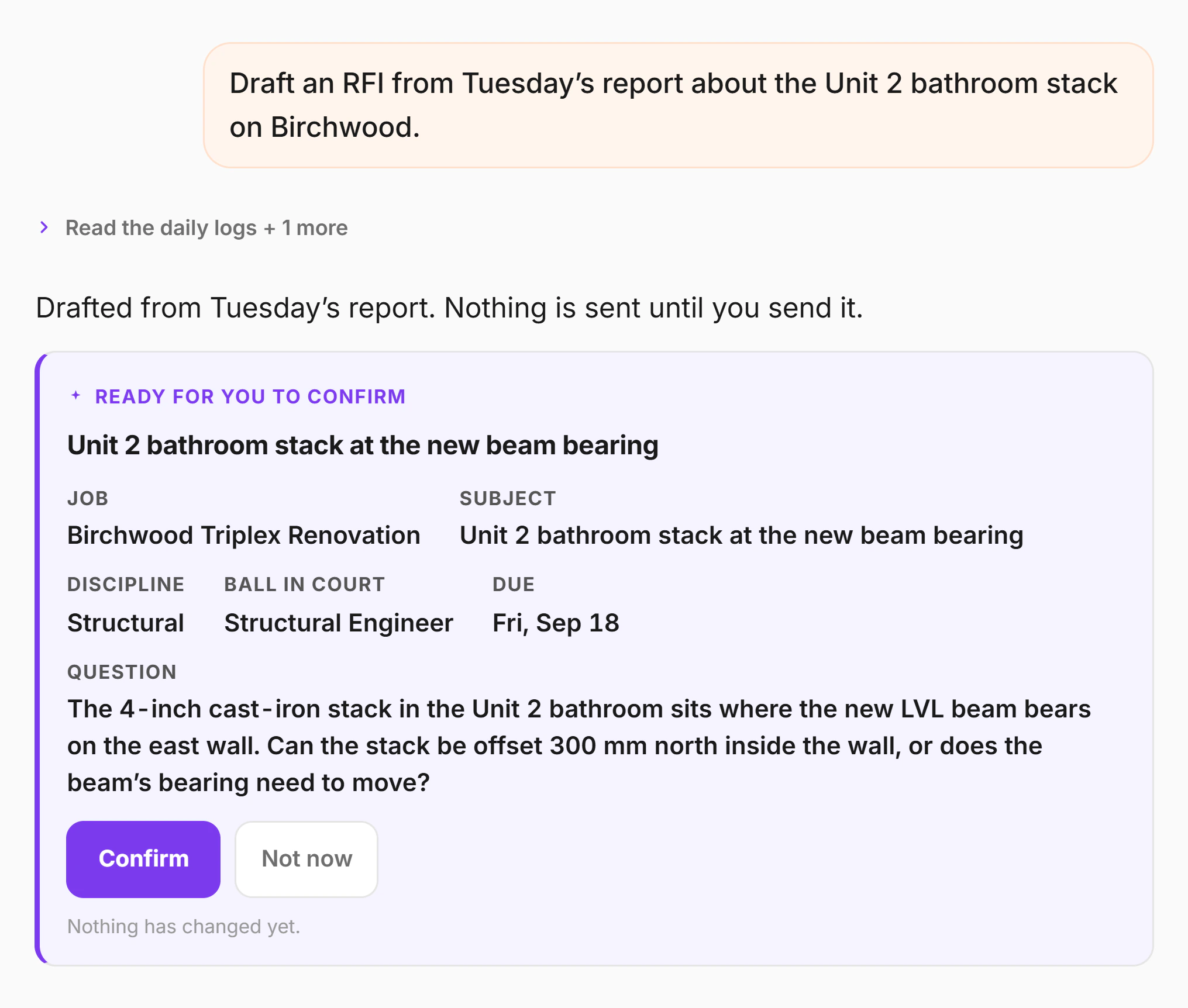

Send it from the RFI, and the architect or engineer answers from a secure link with no login. The answer files itself on the RFI with their name and the date.
The people waiting on it get an email. The log shows what’s open, what’s overdue and how long answers take.
An RFI still waiting two days after it went says so, and you can send a reminder from it.
RFIs, and drafting them with AI, are on Crew at $89 a month and Pro at $179. Compare the plans.
More on RFIs and the Assistant on the features page.